Overview
Self-hosted immersion tracker and sentence miner. AutoMiner records what you watch and listen to (YouTube, Stremio, Spotify podcasts), finds the sentences from that dialogue that are one unknown word away from comprehensible (i+1), cuts an audio clip and a screenshot for each, and sends finished notes to Anki.
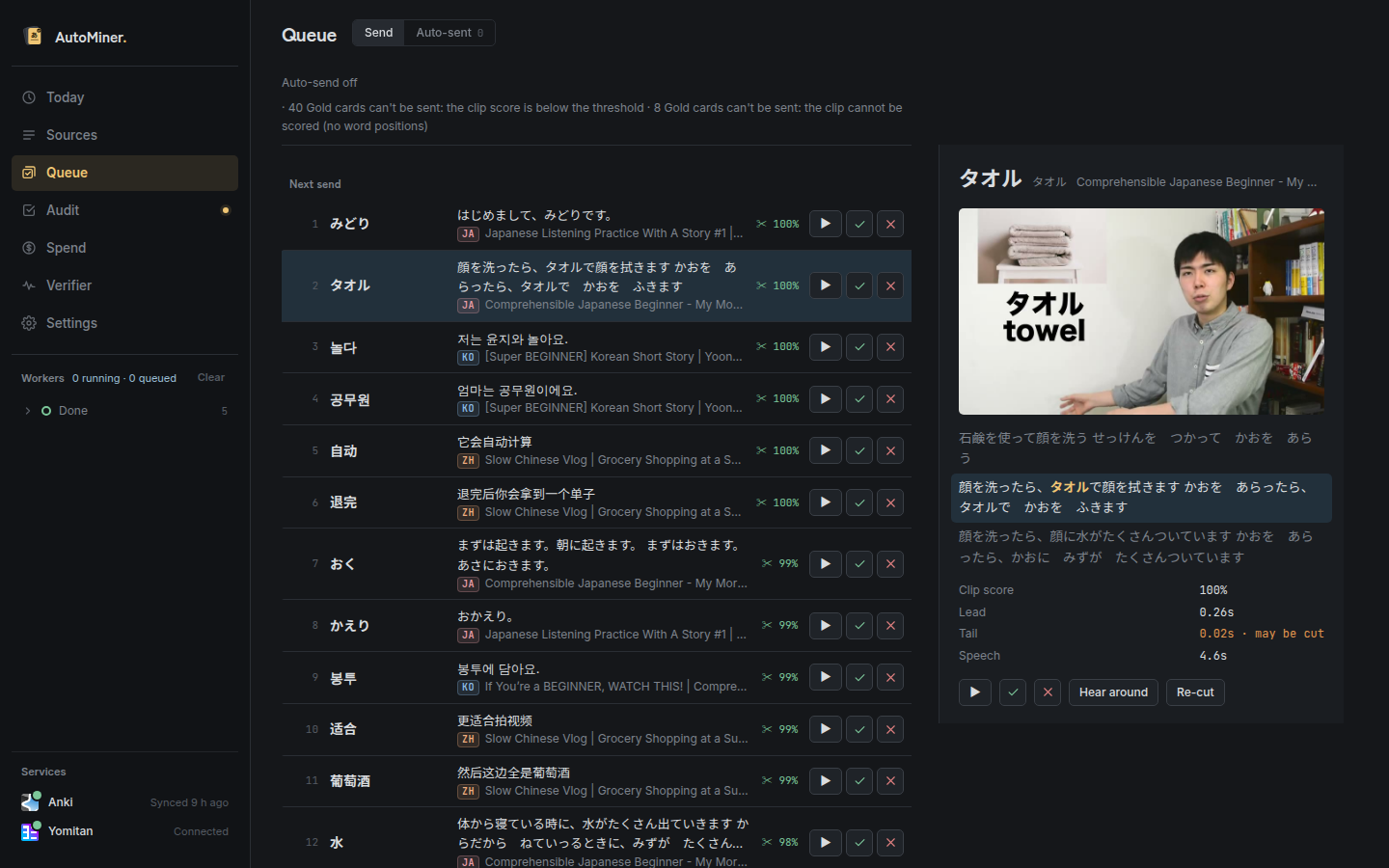
- Tracks real watch time. Every watch is a set of intervals; rewinding over the same minute counts once.
- Mines only what you heard. Candidates come from the subtitles of the parts you watched, scored against the words you already know in Anki.
- Builds the whole card. Dictionary form, reading, definitions (Yomitan), frequency, pitch, translation, a trimmed sentence clip and a screenshot.
- Checks its own work. With the subtitle check on, subtitle timing is verified against the audio before clips are cut, and each clip is scored so badly cut or music-drowned clips are held back.
- Runs on a small server. A Raspberry Pi is enough for the core; heavy audio models can run on another PC, in a container, or as a paid API.
Japanese is the primary language; Korean and Chinese have language profiles (docs/language-profiles.md).
Contents
Section titled “Contents”- How it works
- The web UI
- Installing · Requirements
- Optional services
- Anki output
- Data model
- Documentation
- Development
How it works
Section titled “How it works”Components
Section titled “Components”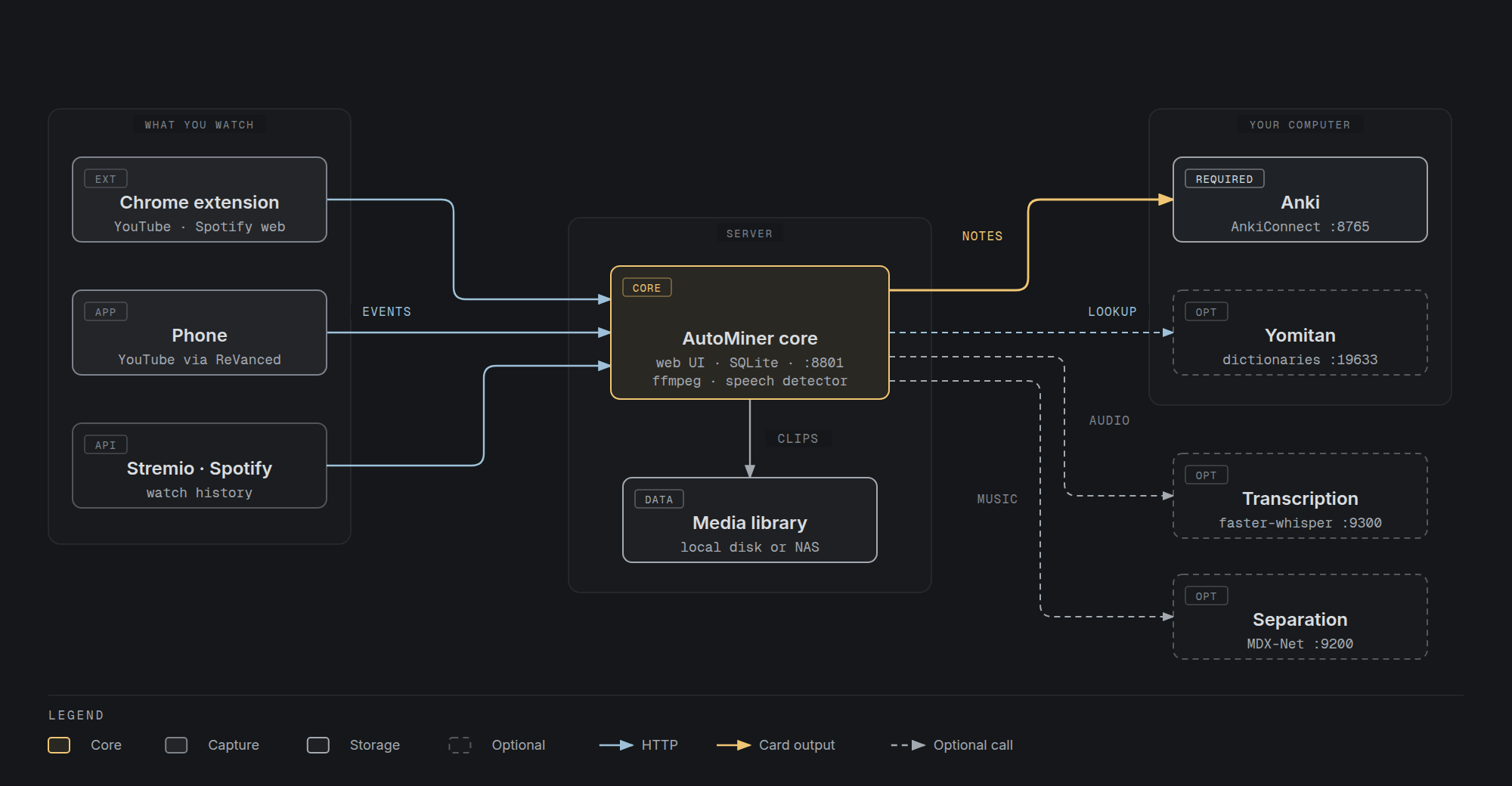
The server owns all state: the ledger, the job queue, the media and every clip. Clients only report what was watched and receive finished notes. Machines talk over the LAN or Tailscale.
From a watch to a card
Section titled “From a watch to a card”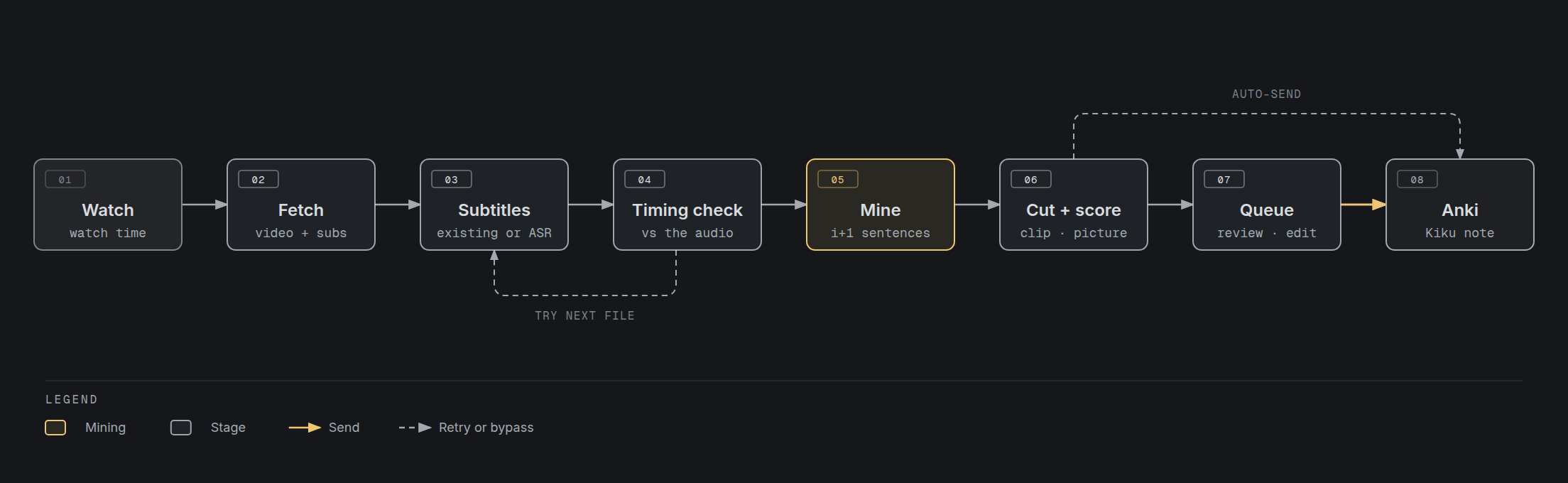
Each stage is a row in the job queue, run by the core’s worker. A stage records its outcome on the job, so any result can be traced back to the step that produced it, and a stage whose code or settings change is re-run only for the sources it affects.
Sources. YouTube is fetched with yt-dlp (with a VPN fallback when YouTube refuses the server). Stremio watches are fetched through services you run and point AutoMiner at: a search (Prowlarr or a Stremio addon) and Deluge behind a VPN (self-host.md); none is set by default. Spotify podcast episodes are fetched from the show’s RSS feed.
Subtitles. AutoMiner prefers subtitles that already exist: a YouTube video’s captions; for Stremio, tracks embedded in the file, then Jimaku. Transcription (ASR) is the last resort, and podcasts are always transcribed. With the subtitle check on (it is off by default), more candidates for an episode are collected from Jimaku, Animetosho and OpenSubtitles and each is checked against the audio. See Subtitles and The judge.
Timing check. Blind transcription of short windows of the audio is compared with each subtitle candidate to decide whether its timing matches, needs an offset, or belongs to a different cut of the episode. Word-level alignment then places each line precisely so clips start and end on speech.
Scoring. A candidate sentence is scored on how many words are unknown (from the Anki collection), sentence length, word frequency and clip quality. The best sentence per word becomes the card; the others stay available as alternatives in the editor.
The web UI
Section titled “The web UI”The core serves the UI itself at http://<server>:8801; there is nothing to build. It works
on desktop and phone, in Japanese or English. The screenshots below come from a demo library
of short YouTube lessons in Japanese, Korean and Chinese, plus one Spanish video that is
fetched but not mined.
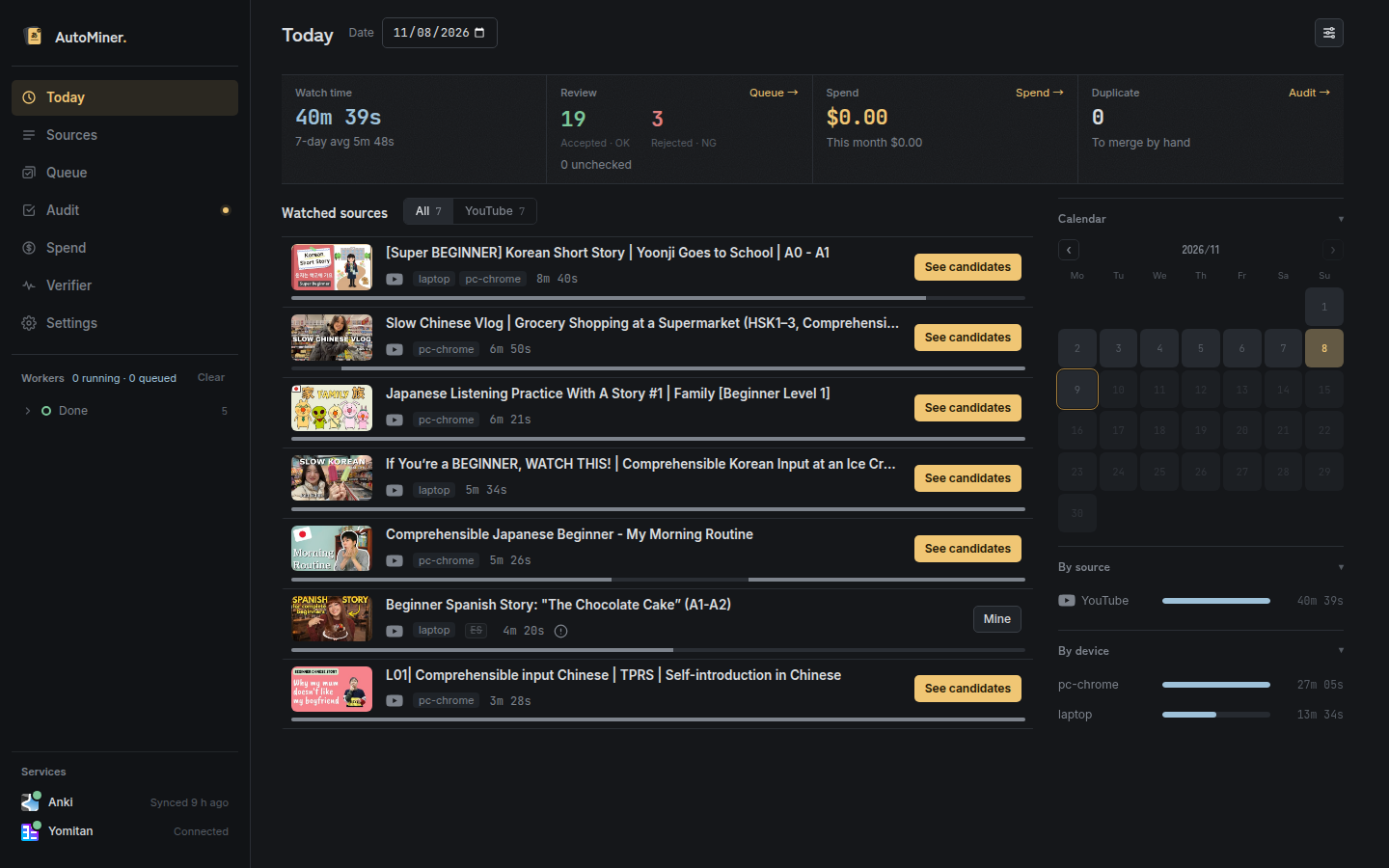
Today sums up a day: watch time against the 7-day average, cards accepted and rejected,
paid API spend, duplicates waiting to be merged, and every source watched with the devices it
was watched on and how much of it was seen. A source in a language you don’t study is fetched
only (here the Spanish one, tagged ES).
 |
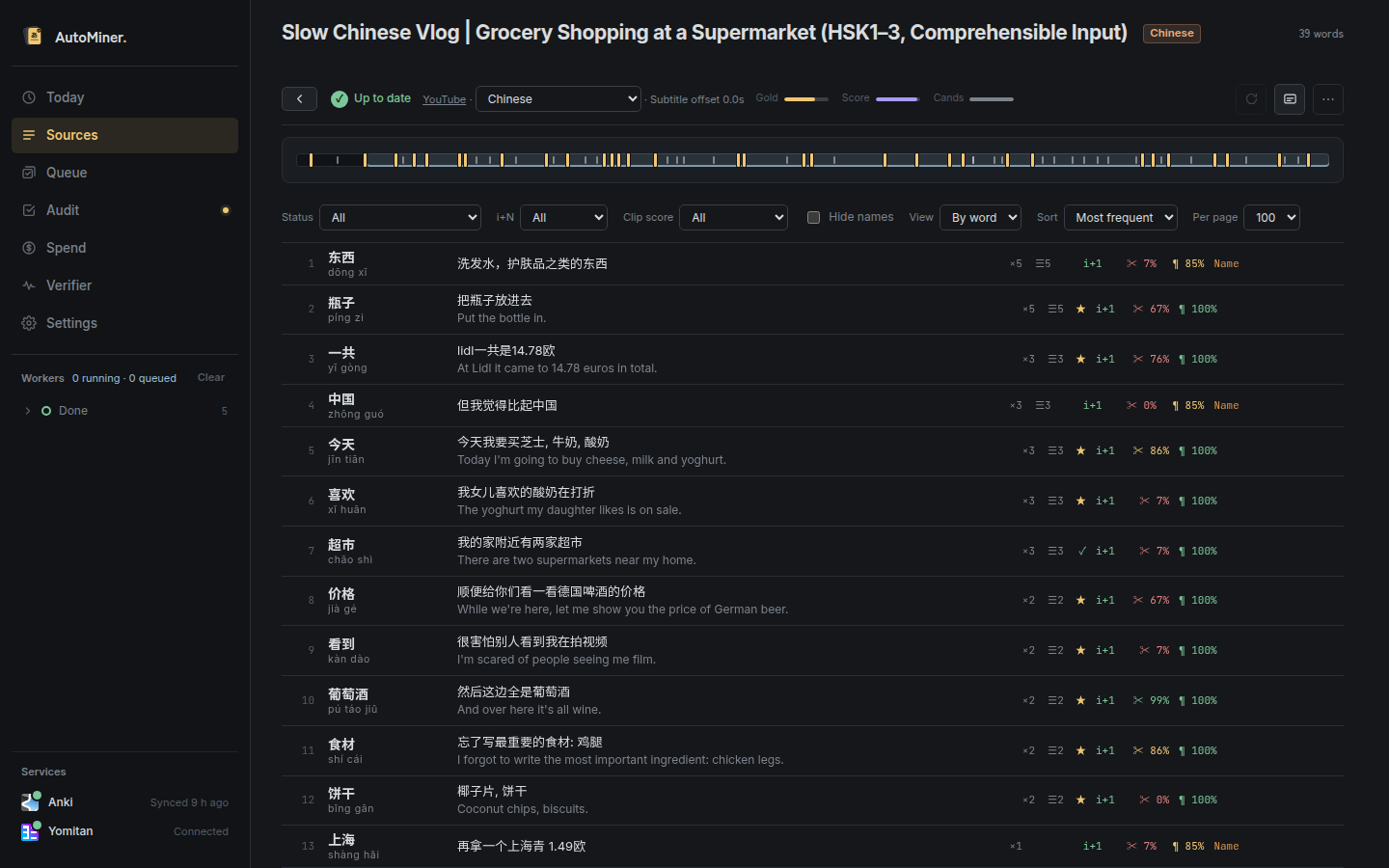 |
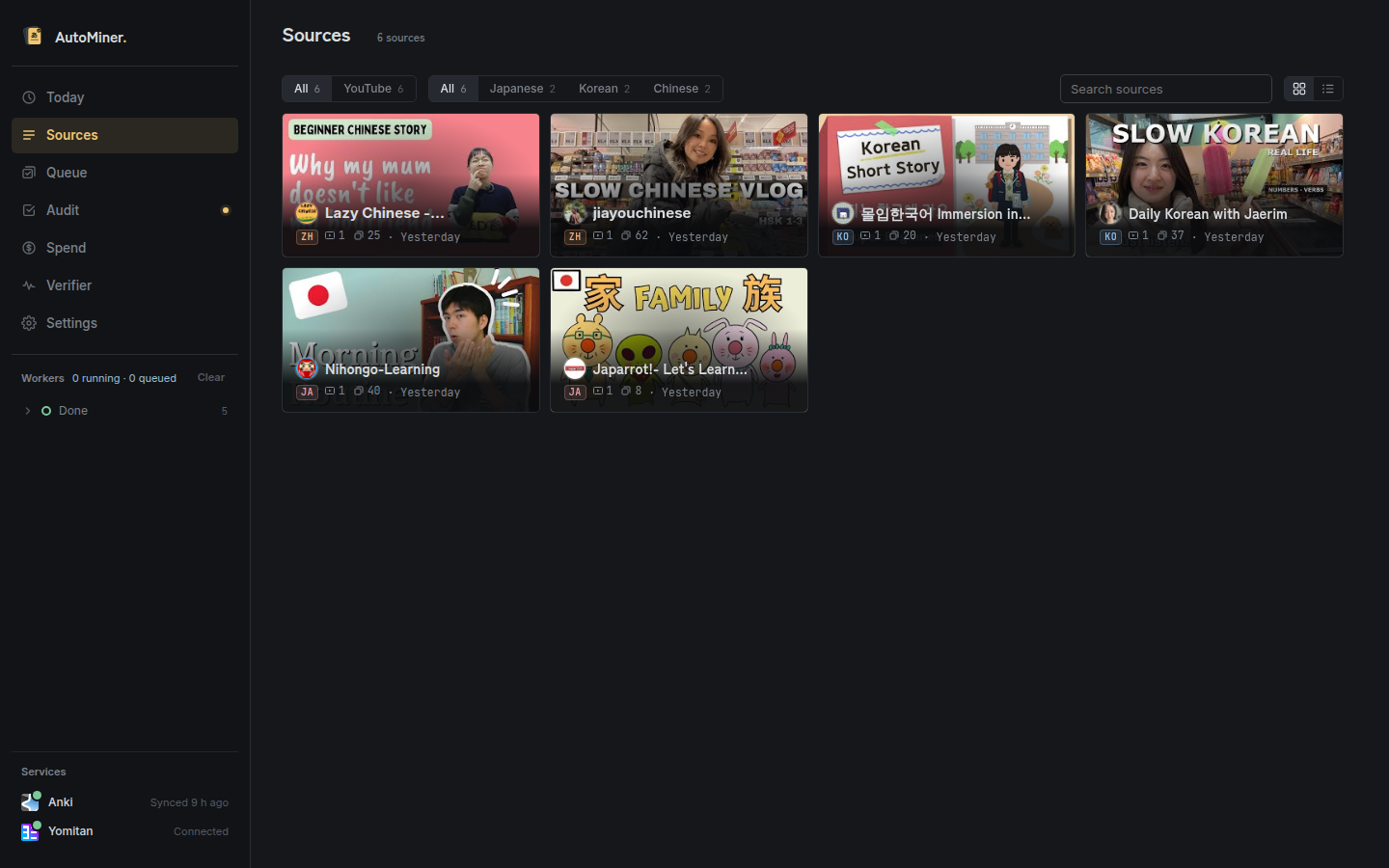
| Sources: everything watched, by channel or show, filterable by language. | A source: its words, each with its best sentence and tags: clip score (✂), sentence score (¶), unknown words (i+N), to send (★) and occurrences (×N), the ones you pick in Columns. |
 |
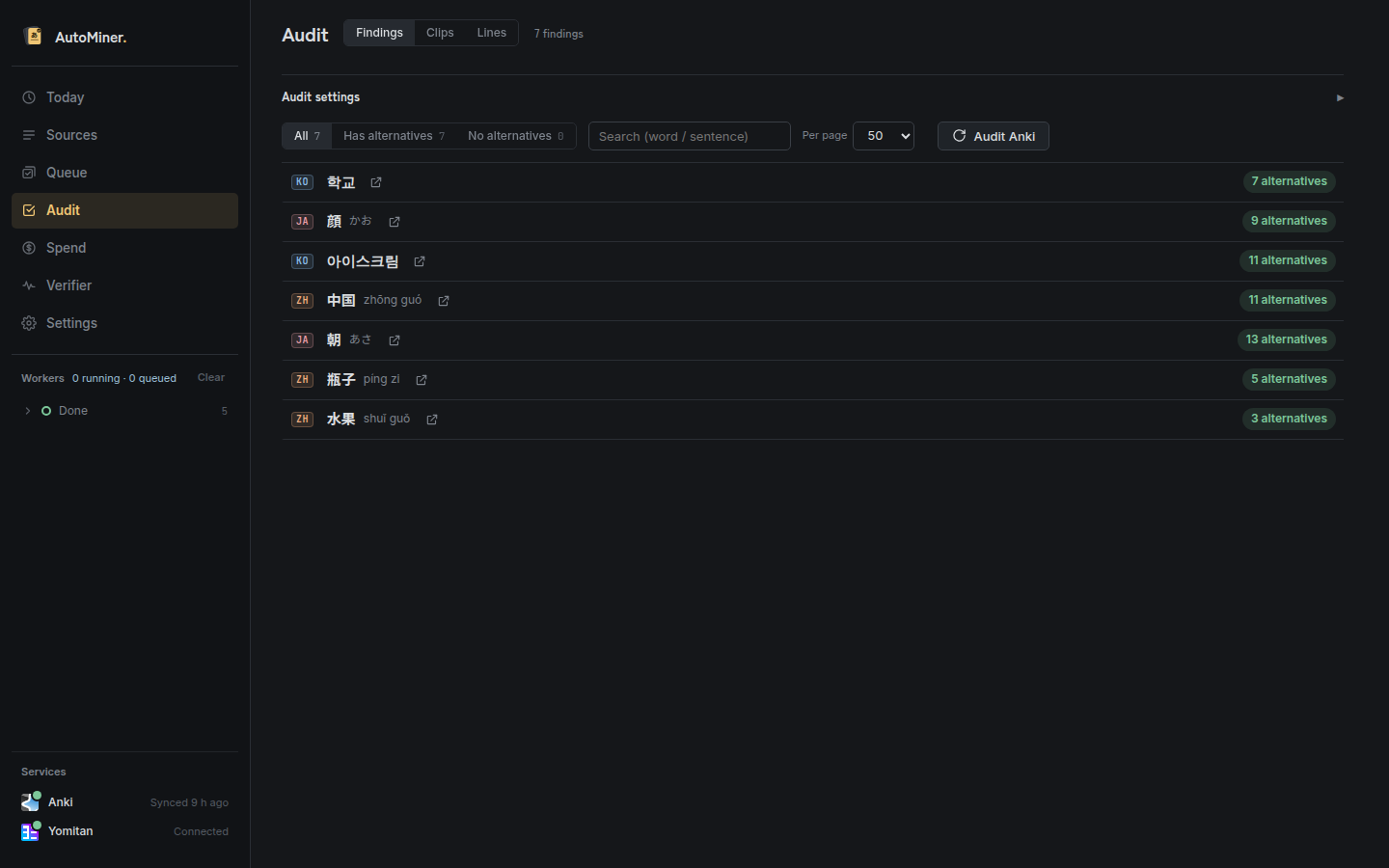 |
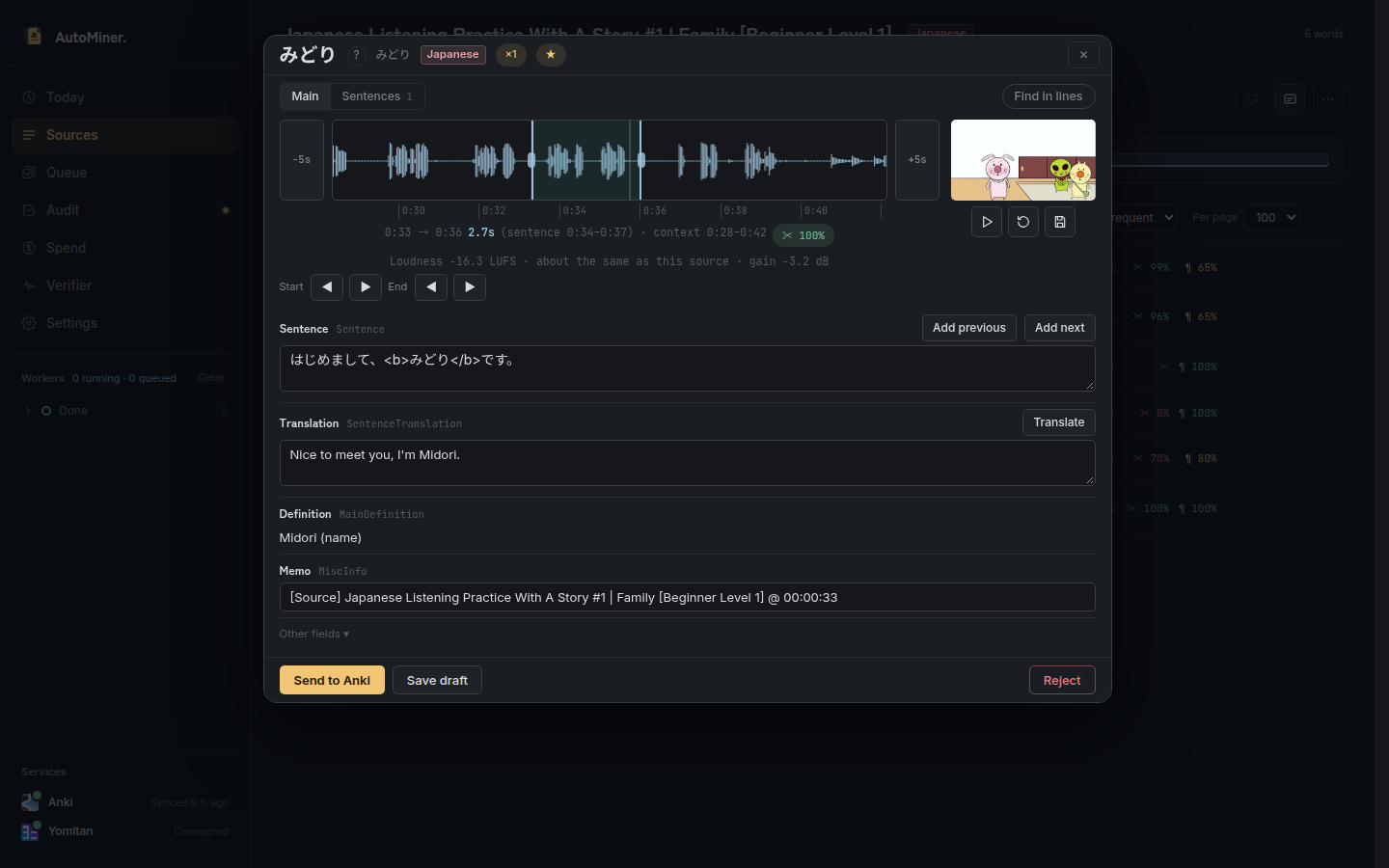
| Editor: the clip’s waveform with draggable edges, screenshot, sentence, translation, definition and every Anki field. | Audit: notes already in Anki that lack a sentence or clip, each with mined alternatives to fill them. |
 |
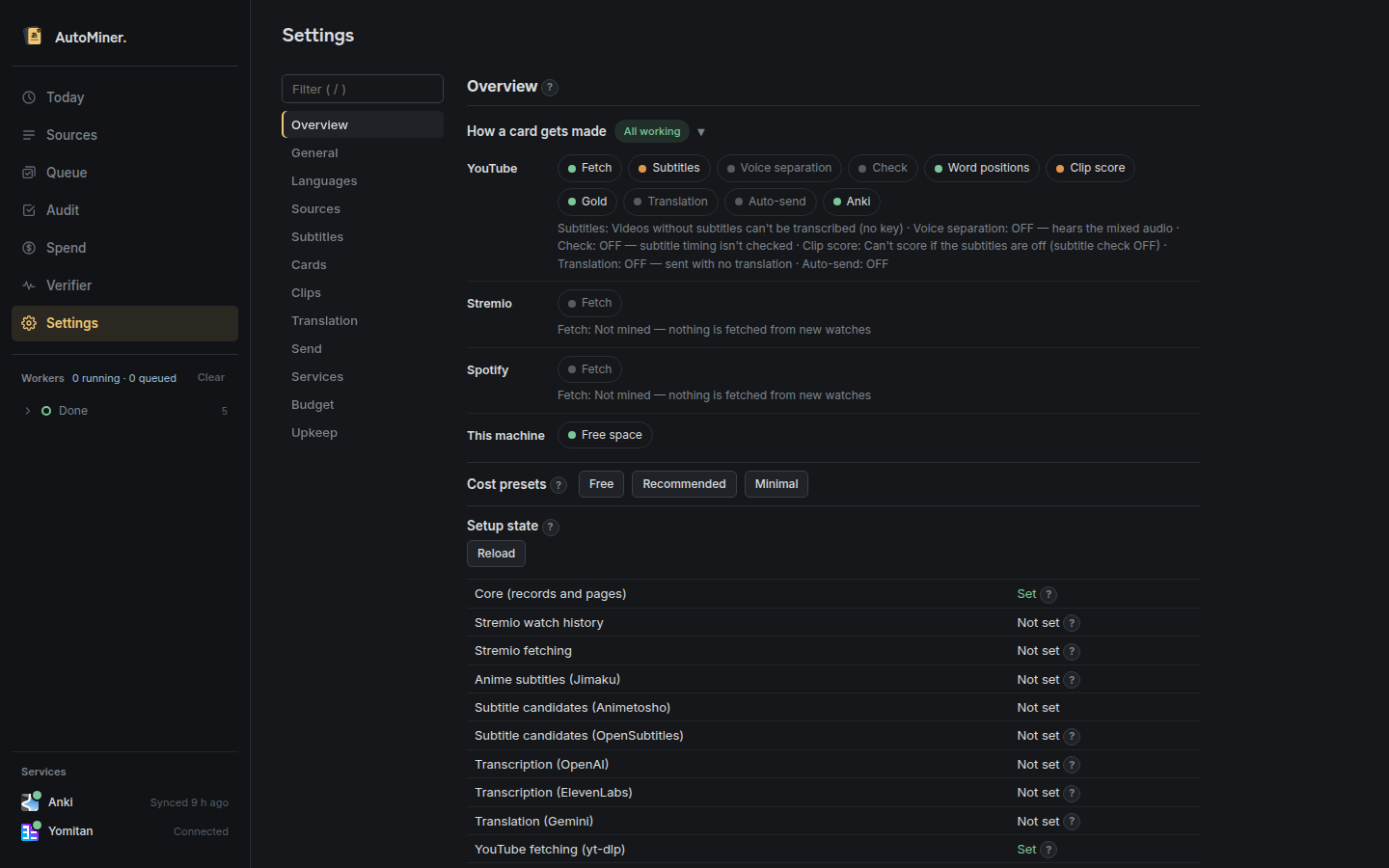 |
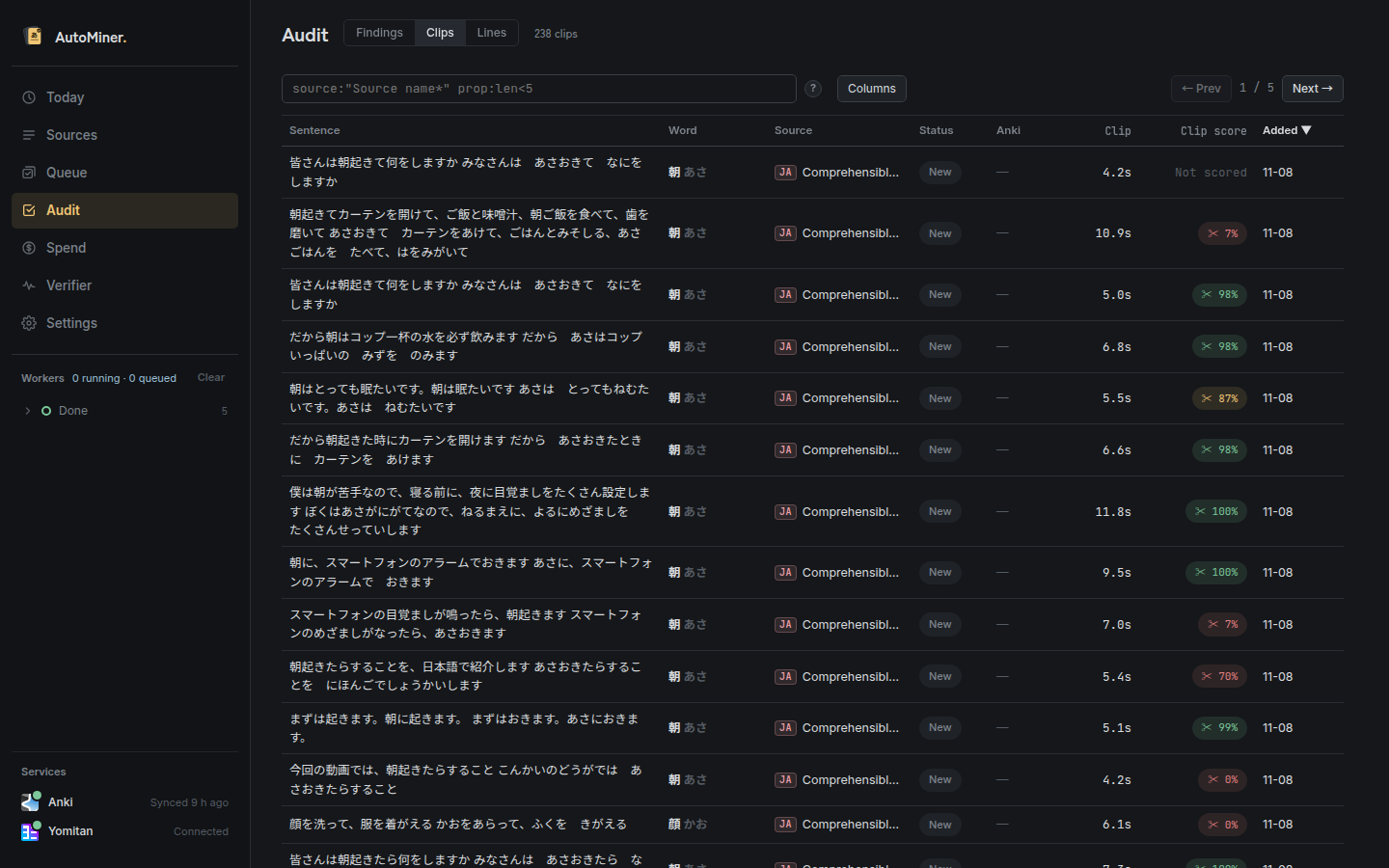
| Audit › Clips: every mined card in one searchable table with clip length, score and status. | Settings: per source kind, the stages a card passes through (green works, red stops), setup state and cost presets. |
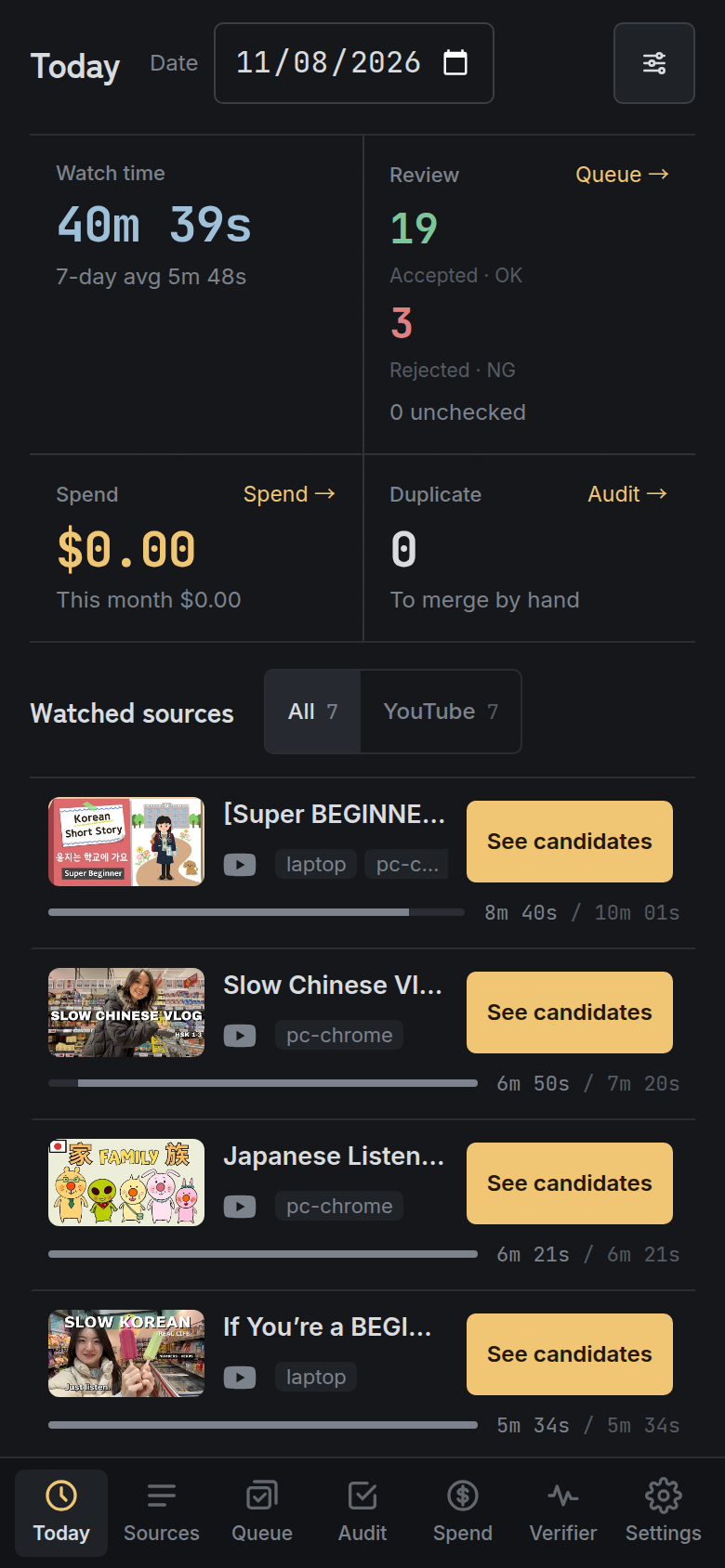
Other pages: Queue (top of this page) to review and send, Spend for paid API usage
against the budget, Verifier for how well the clip judge agrees with your OK / NG. Every
list is keyboard-driven (j/k, space to play, enter to open). On a phone the same pages
stack into one column with a bottom tab bar; the Android app wraps them. Page-by-page
reference: docs/pages.md.
Installing
Section titled “Installing”Requirements
Section titled “Requirements”These are needed no matter which sources you use:
| Requirement | Where | Why |
|---|---|---|
| Python 3.11+ and the AutoMiner core | server | the ledger, job queue, mining and web UI |
| ffmpeg and ffprobe | server | read every video and cut every clip and screenshot |
| Speech detector (onnxruntime + silero model, ~2 MB) | server | trims clips to the speech and scores them; without it clips are trimmed by loudness only and none is auto-sent |
| Anki with the AnkiConnect add-on | your computer, reachable from the server | where cards go, and where AutoMiner reads the words you already know (i+1 needs them) |
| A note type for the cards | Anki | Kiku by default; any note type works once its fields are mapped in Settings |
| At least one way to report watches | your devices | the Chrome extension, the Stremio or Spotify tracker, or the YouTube patch for Android |
install.sh installs everything on the server side (including the speech detector and its
model); Anki and the capture source are yours to set up.
Everything else is optional: a feature without its key or URL is reported as not configured and its jobs are skipped with the reason.
| Optional feature | Needs |
|---|---|
| YouTube | Node.js (installing YouTube downloads yt-dlp) |
| Stremio tracking / fetching | a Stremio account key / your own search and Deluge behind a VPN |
| Spotify podcasts | a Spotify developer app |
| Anime subtitles | a Jimaku key |
| Definitions | Yomitan with its API server (cards are sent without definitions otherwise) |
| Timing check, word alignment | the judge (a local download or a Jev key) and a transcription service (container, this machine, or a cloud key) |
| Music-heavy audio | the separation service |
| Translation | a Gemini or OpenAI key |
Keys are entered in Settings › Services or with autominer setup; they are stored one file
each under the server’s secrets directory, never in the database.
Server
Section titled “Server”git clone https://github.com/Chrisyk/AutoMinercd AutoMinersh install.shinstall.sh installs the system packages (git, Python 3.11+, ffmpeg, Node.js) with apt,
pacman, dnf or Homebrew, installs uv, builds the virtualenv with
the speech detector and downloads its model, puts the autominer command on PATH and registers a service that starts at boot (systemd, or
launchd on macOS). It ends by printing the address of the web UI. Re-running it upgrades in
place. --no-packages and --no-service skip those steps.
Open the printed address: a fresh install starts on a setup page that connects Anki, the
dictionary and what you watch. Everything there can be changed later in Settings.
A fresh install has no platform installed, and watches from a platform that is not installed
are dropped: install the ones you use in Settings › Sources › Platforms › Add
(Quickstart). autominer doctor prints the state of every feature.
Manual steps, per-distro packages and YouTube specifics: docs/install.md. A permanent Raspberry Pi deployment with backups and guarded upgrades: deploy/README-pi.md.
Your computer
Section titled “Your computer”- Anki with the AnkiConnect add-on (required), bound so the server can reach it. Paste its URL on the setup page.
- Chrome extension (
extension/): load it unpacked, then paste the server URL into its popup. It reports YouTube and Spotify web playback to the server. Coming from 0.11 or older, reload it once by hand: docs/install.md. - Yomitan (optional) with its API server, for dictionary definitions on cards.
Optional services
Section titled “Optional services”Two audio models are too heavy for a Raspberry Pi and run elsewhere. Each can be chosen per source kind in Settings as Cloud (paid API), Container (another PC or NAS) or This machine (the server itself).
| Service | What it does | Model |
|---|---|---|
| Transcription | Ground truth for the timing check and word positions | large-v3-turbo, ~1.6 GB |
| Separation | Removes music so speech can be heard in songs and openings | Kim_Vocal_2, ~67 MB |
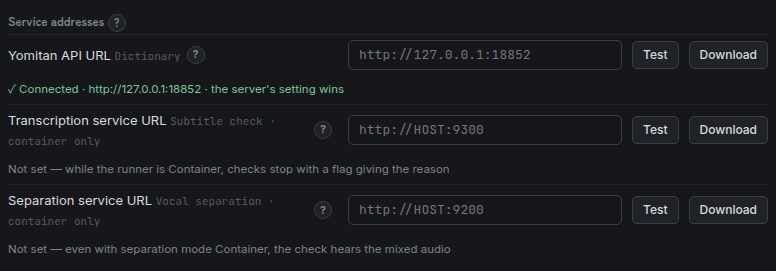
Download from the UI. Settings › Services has a Download button beside each service URL (and the setup page has both). The zip contains the service and its installers:
- Windows: run
install.cmd. It installs Python if needed, builds a venv, downloads the model, registers a scheduled task that keeps the server running, and prints the URL to paste back into Settings.install.cmd -Gpuruns the separator on any DirectX 12 GPU. - Linux / macOS: run
sh install.sh. It uses Docker when available (--gpufor NVIDIA), otherwise a venv and a systemd user service.
From a checkout, docker compose --profile separator up -d and
docker compose --profile whisper up -d start the same images. Details, GPU notes and resource
use: docs/self-host.md. Neither service has authentication; keep them on
your LAN or Tailnet.
Anki output
Section titled “Anki output”Notes use the Kiku note type (deck Backlog by default; both configurable per language in
Settings).
| Field | Content |
|---|---|
Expression / ExpressionReading / ExpressionFurigana |
target word, dictionary form and reading |
ExpressionAudio |
word audio from Yomitan; for Korean and Chinese, a Wikimedia Commons recording when Yomitan has none |
Sentence / SentenceFurigana |
the line as heard, target word in bold |
SentenceAudio / Picture |
the trimmed clip (.mp3) and screenshot (.jpg) |
MainDefinition / Glossary |
short meaning / Yomitan dictionary entries |
Frequency / FreqSort |
frequency lists and a numeric rank for sorting |
PitchPosition / PitchCategories |
pitch accent when known, empty otherwise |
MiscInfo |
source and timestamp |
Tags: <Platform>::<Series> (a YouTube video’s own title instead of a series) and auto::<candidate id>, the link back to the card in AutoMiner.
A word that already has a note can be merged into it, overwrite it, or become a deliberate
duplicate.
Data model
Section titled “Data model”| Table | Holds |
|---|---|
media / media_alias |
something watched, under every ID scheme that names it |
session / interval |
watch time: the union of intervals, so a rewatched minute counts once |
segment |
subtitle cues on the media’s timeline |
candidate |
a mineable sentence with its target word, clip, screenshot and score |
anki_link |
the note a candidate became |
job |
the queue every stage runs from, with each stage’s outcome |
The schema is core/autominer/schema.sql; the database is created on first start. Settings
are rows in the database and secrets are files beside it, so the database plus the secrets
directory hold all configuration and history (the media library can always be fetched again).
Documentation
Section titled “Documentation”| Topic | |
|---|---|
| Installing step by step | docs/install.md |
| YouTube on an Android phone (Morphe patch) | docs/phone-youtube.md |
| Settings, secrets and configuration files | docs/configuration.md |
| What each page does | docs/pages.md |
| Self-hosted audio services | docs/self-host.md |
| Subtitle timing and the timing check | docs/subtitle-sync.md |
| Clip trimming | docs/clip-trimming.md |
| Re-mining and freshness | docs/recalc-fresh-mining.md |
| Language profiles | docs/language-profiles.md |
| Raspberry Pi deployment and upgrades | deploy/README-pi.md, docs/safe-deploy.md |
| Pack architecture (for implementers) | docs/packs-architecture.md |
| Repository layout | docs/repository-layout.md |
| README diagrams (source) | docs/diagrams/ |
Upgrading from an older release
Section titled “Upgrading from an older release”A database last started before commit
7f134861
(2026-11-05) is refused at startup with a message naming that commit: start that version once,
let it finish starting, then start the newer one. New installs are unaffected.
Development
Section titled “Development”cd coreuv venv .venv && uv pip install -p .venv/bin/python -e ".[test,lint]".venv/bin/pytest tests/.venv/bin/ruff check ..CI runs the same commands. See CONTRIBUTING.md.
License
Section titled “License”AutoMiner is free software: you can redistribute it and modify it under the terms of the GNU Affero General Public License, version 3 or (at your option) any later version. If you run a modified AutoMiner for other people over a network, offer them its source. Parts that are other people’s keep their own licenses: see THIRD_PARTY_NOTICES.md.
core/ the server: FastAPI app, job worker, mining, adapters, schema, web UI (core/static)extension/ Chrome capture extensionandroid/morphe-patches/ YouTube watch reporting for Android (a Morphe patch bundle)separator/ vocal separation service (MDX-Net)probe_asr/ transcription service (faster-whisper)deploy/ systemd units, Raspberry Pi install and deploy scriptsscripts/ operational toolingdocs/ reference documentation